Short answer. LiftMaster wiring types are the operating modes you pick on the Logic 5.0 selector dial. C2 is the factory default. Open is momentary and close has to be held. B2 makes close momentary. T and TS add a timer to close, and FSTS mixes them. D1 is constant pressure both ways, and E2 rolls back on release. B2, T, TS and FSTS all need a monitored entrapment device.
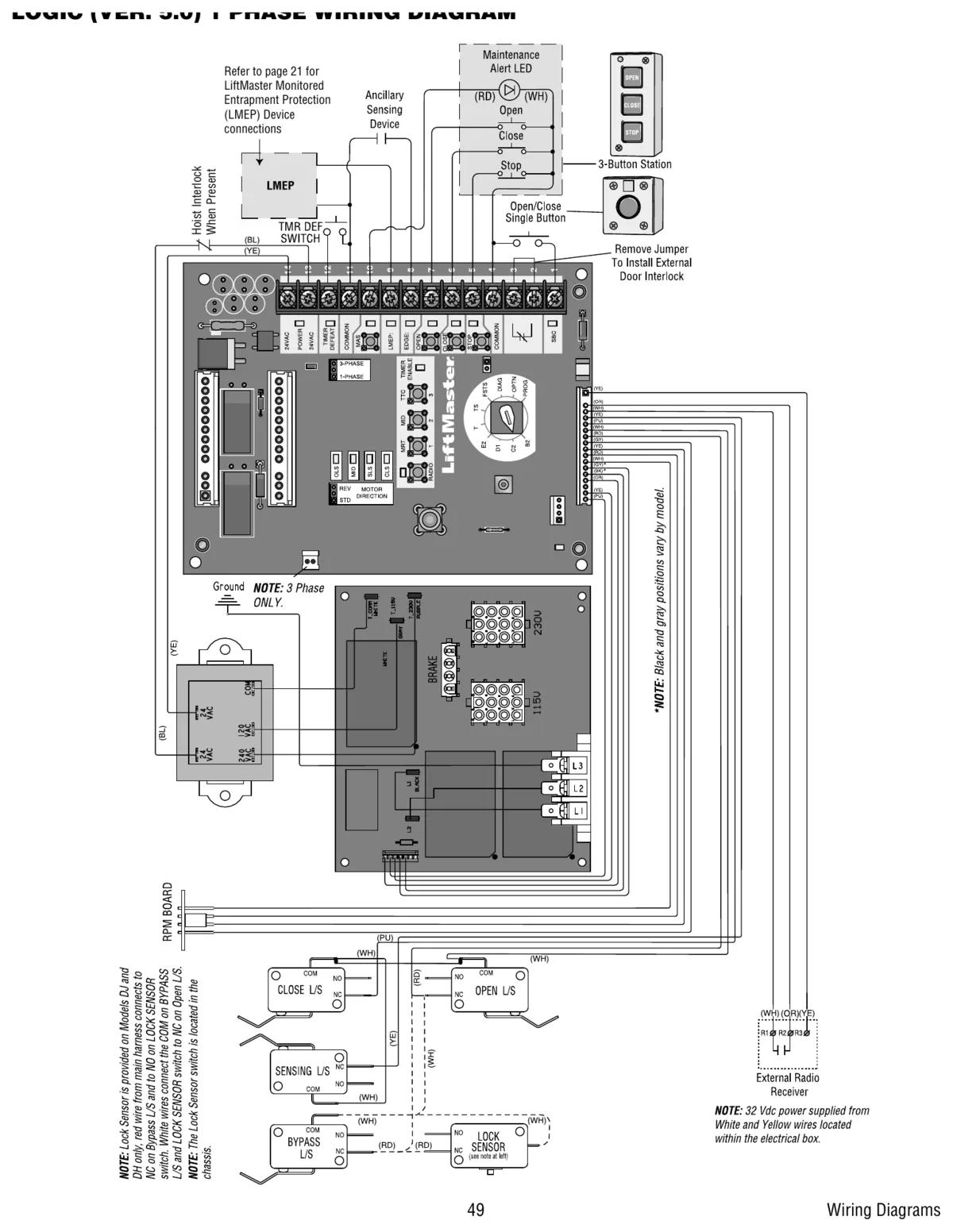
On Logic 5.0, "wiring type" doesn't mean the wires. It's the operating mode. It decides if a button press is momentary or has to be held. It also decides if the door closes itself and what a remote can do. You set it on the selector dial on the logic board. This page explains each of the LiftMaster wiring types the way the installation manual defines them.
Lock out power before you change field wiring at the terminal strip. Turning the dial itself is done with power on, so keep clear of the drive with the cover open.
Quick comparison
| Mode | Open | Close | Timer to close | LMEP needed |
|---|---|---|---|---|
| C2 (default) | Momentary | Hold to close | No | Recommended |
| B2 | Momentary | Momentary | No | Required |
| T | Momentary | Momentary | Yes, stop button cancels it | Required |
| TS | Momentary | Momentary | Yes, stop button won't cancel | Required |
| FSTS | Momentary | Momentary | Yes, from single button | Required |
| E2 | Momentary | Hold, rolls back on release | No | Recommended |
| D1 | Hold to open | Hold to close | No | Recommended |
C2, the factory default
LiftMaster ships every Logic 5.0 operator in C2. Open and stop are momentary. Close is constant pressure. The door has open override plus wiring for a sensing device to reverse. A programmable mid-stop works in C2. It's the safe default, and it's also the reason someone calls us saying the door "won't close unless I hold the button". That's C2 doing exactly what it's meant to.
B2, momentary close
B2 makes every button momentary. It also lets auxiliary devices open and close the door, and keeps open override. It needs an LMEP device learned on the board. B2 suits most warehouse doors with good photo eyes.
T and TS, timer to close
Both add timer to close. In T, every device that opens the door except a sensing edge starts the timer. The open button and a radio can recycle it, and the stop button turns it off until the next command. TS is stricter. It will try to close from any position except fully closed or with a safety input active, and the stop button won't disable it. The only way to defeat the timer in TS is a defeat switch wired to terminals 11 and 12. Programming the timer itself is on the timer to close guide.
We like TS on a strata parkade door. TS on a shop door where staff stand in the opening loading pallets is asking for trouble, because nobody can stop the timer with the stop button.
FSTS
FSTS is the hybrid. A single button station opens the door to the full open limit and starts the timer. It bypasses the mid-stop. The operator then runs in TS until the door hits the down limit or is stopped in travel. After that it drops back to B2. A single button remote in FSTS only opens, always with the timer.
E2 and D1
E2 is momentary open with override and constant pressure close. Let go of close and the door reverses back up, which LiftMaster calls the roll-back feature. It works with a 3-button station only. D1 is constant pressure in both directions with a sensing device wired to stop. It works with a 2 or 3-button station. Neither mode supports single button remotes.
T and TS car dealer modes
Two more dial positions use the single button control input (terminals 1 and 4) to bring a door from closed to the programmed open mid-stop and hold it there, ignoring extra SBC commands. A treadle, photo eye or loop detector usually feeds that input. Both mid-stop and timer to close must be programmed first, and an LMEP device is required.
No LMEP, fewer modes
Without a learned monitored entrapment device, only C2, D1 and E2 are available. If someone pulled the photo eyes and the timer stopped working, this is why. See the LiftMaster entrapment protection guide.
Terminal notes from the control diagram
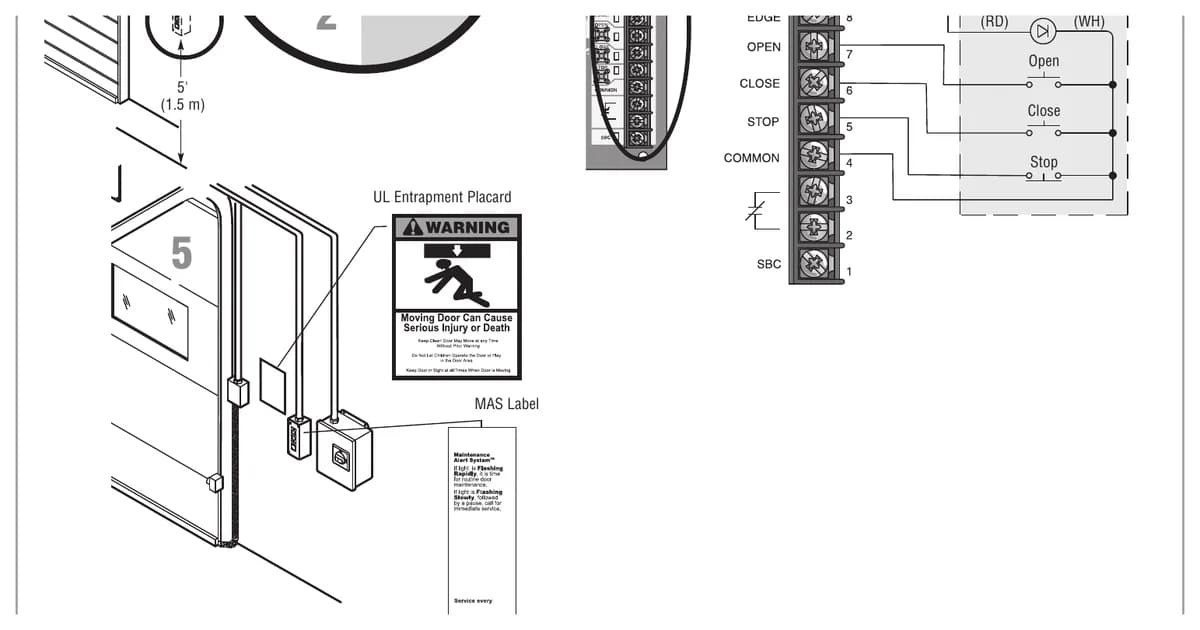
The 3-button station must be connected for operation. If no stop button is used, a jumper goes between terminals 4 and 5. Stop buttons on multiple stations must be wired in series, which may mean removing the factory jumper bar in the 3-button station. Terminals 11 and 4 are both common. External interlocks wire in place of a factory jumper, and more than one interlock goes in series. Low voltage control wiring has to be insulated 20 AWG or heavier, run in conduit separate from power.
LiftMaster's last note on the diagram is worth repeating. Add accessories one at a time and test each one before adding the next. It saves hours.
Help choosing a mode
CCGDS sets up LiftMaster commercial operators for warehouses and parkades across Metro Vancouver. Call (604) 206-5727. More on the LiftMaster repair hub and our UL 325 compliance guide.