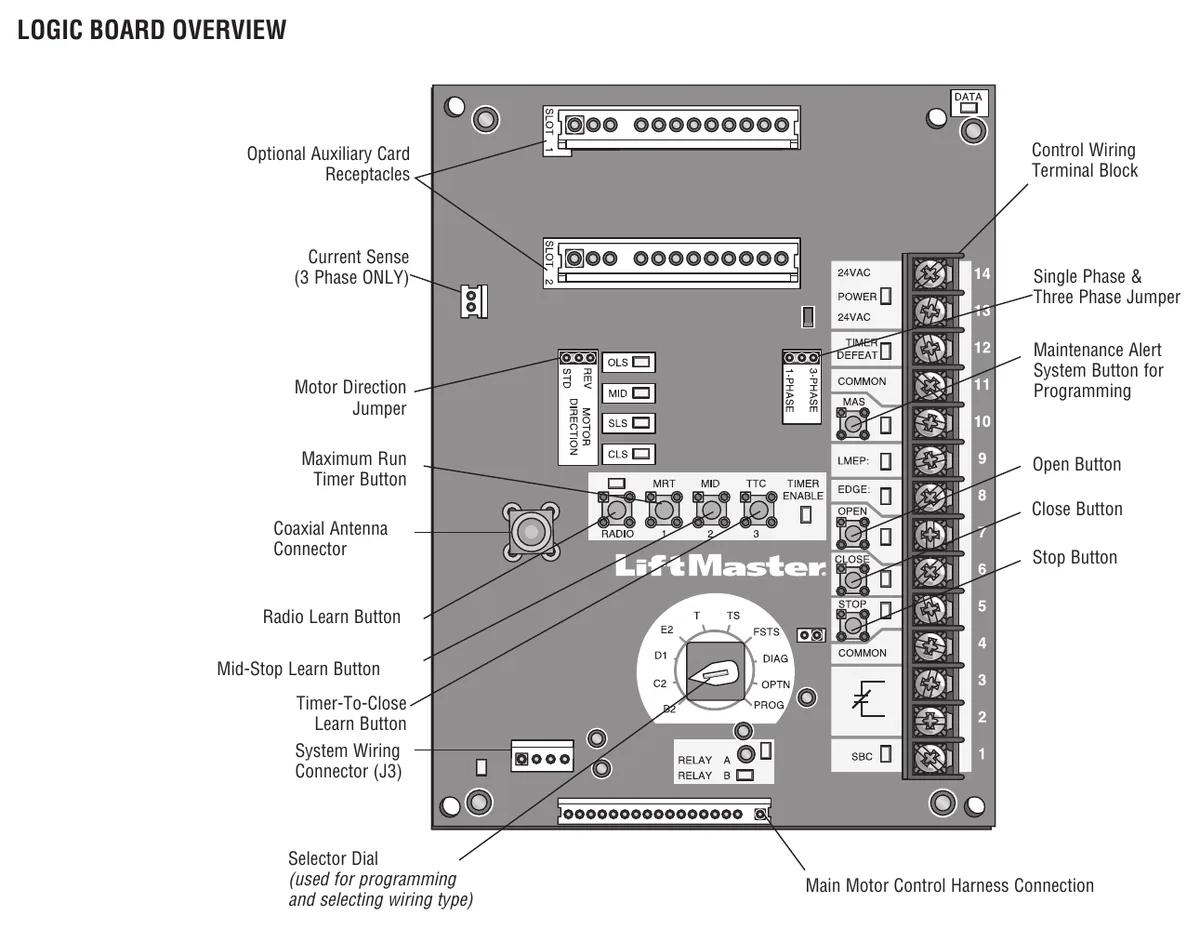
Short answer. LiftMaster remote programming on a Logic 5.0 operator happens at the board. Press and release RADIO, hold the remote button until the RADIO LED flashes rapidly, then press RADIO again. The board needs a monitored entrapment device learned first or it won't take remotes. The built in Security+ 2.0 receiver holds up to 90 remotes and 30 keyless entry devices.
Programming a remote to a commercial LiftMaster isn't like a home opener. There's no learn button on a ceiling unit. You open the electrical box and use the buttons on the logic board. The operator also has to have a monitored entrapment device learned first. This LiftMaster remote programming guide follows the Logic 5.0 installation manual step by step.
Lock out power to open the cover and land any wiring. You need power back on to program, so keep hands clear of the drive while the box is open.
What the receiver takes
Logic 5.0 has a built in 3-channel Security+ 2.0 receiver. It holds up to 90 remote control devices and up to 30 keyless entry devices. Each button you program uses one of the 90 channels. A 3-button remote set up as open, close and stop uses three.
LiftMaster's commercial remotes in the manual are the 811LM single button and the 813LM three button. Both are encrypted DIP switch remotes, and the 813LM is marked red, yellow and green for open, close and stop. The 877LM is the wireless keypad, and it can hold temporary codes for visitors or deliveries. LiftMaster also sells the 893MAX, a 3-button visor remote that runs up to three openers or myQ accessories.
If you need more than 90, that's what the STAR1000 commercial access control receiver is for. It connects up to 1,000 LiftMaster remotes and lets you suspend a remote and reinstate it later. For a strata parkade with a few hundred fobs, we'd put in a STAR1000 from day one instead of fighting the board limit.
The LMEP rule
The manual states it before every remote procedure. The following programming requires a LiftMaster Monitored Entrapment Protection device. If there's no learned photo eye or edge, the board won't learn remotes the normal way. Check the LMEP LED is solid green before you start. The entrapment protection guide covers what counts.
Programming a standard remote
- Press and release RADIO on the logic board. The RADIO LED lights.
- Hold the remote button until the RADIO LED flashes rapidly, then let go. The LED goes solid again. Repeat for more remotes.
- Press and release RADIO to finish.
If you do nothing for 30 seconds, the board drops out of remote learning. The MAS and RADIO LEDs flash briefly to show it. The radio then stays in learn mode for myQ devices for another 150 seconds before shutting off completely.
Setting up a 3-button remote as open, close and stop
This turns a Security+ 2.0 or DIP switch remote into a wireless 3-button station. The large button opens and the middle one closes. The third is stop.
- Press and release RADIO. The LED lights.
- Press and release OPEN on the board. The RADIO LED flashes and goes solid. Press the remote button you want for open. The LED flashes to confirm.
- Do the same with CLOSE on the board and the close button on the remote.
- Do the same with STOP.
- Press RADIO to finish.
Single button remote as SBC
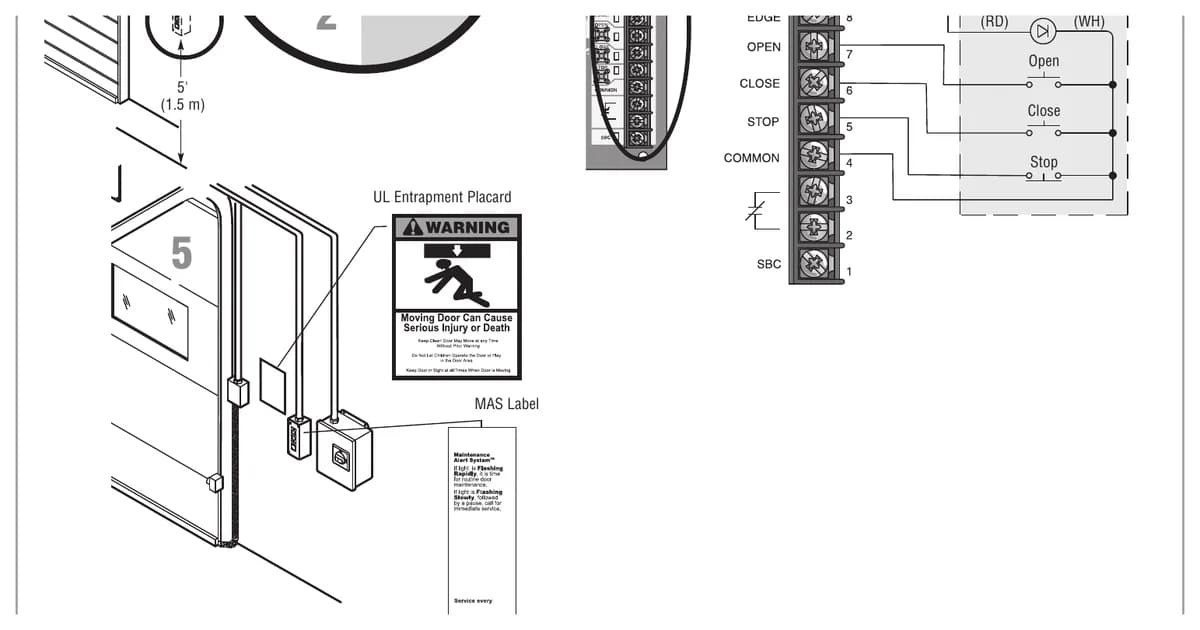
A remote can also work as a wireless single button control. Press RADIO, then press the wired SBC button. If there's no SBC button, the manual allows a jumper to briefly short SBC and COMMON. The LED flashes and goes solid. Now hold the remote button until the LED flashes, then press RADIO to finish.
What that button does depends on the wiring type. In B2 it goes open, stop, close, reverse, stop. In T and TS it does the same and also starts or refreshes the timer to close. In FSTS it only opens. It starts the timer and skips any mid-stop. The manual says single button remotes aren't supported in D1 or E2. In C2 they only open, and stop while opening. The wiring types page explains each mode.
Adding remotes from the wall station
There's a feature that lets the owner add remotes from the 3-button station without opening the box. It's off by default. To turn it on, set the dial to PROG, press RADIO, then press MID. The RADIO LED flashes 6 times. Press RADIO and set the dial back. To turn it off, follow the same steps with MRT in place of MID, and the LED flashes 3 times.
With it on and the door fully closed, hold STOP. Keep holding and add CLOSE, then OPEN. Let go of all three when the MAS LED lights. Then hold the remote button until the MAS LED goes out.
Our blunt take is that this feature belongs on single tenant buildings only. In a multi tenant building, anyone at the wall station can add a remote you'll never track down.
Erasing all remotes
Hold RADIO until the LED flashes rapidly, about 5 seconds. Every remote and keypad is erased. A factory reset does not erase remotes, so don't rely on it when a tenant leaves.
Range problems
If remotes only work up close, check the antenna. LiftMaster sells antenna extension kits, the 86LM at 15 feet and the 86LMT at 25 feet. Radio LED codes are listed on our Logic 5.0 error codes page.
We can do it for you
CCGDS programs LiftMaster commercial remotes and keypads across Metro Vancouver from our Richmond shop. Call (604) 206-5727. For app control, see the myQ gateway setup guide, and for everything else the LiftMaster repair hub.