Short answer. LiftMaster Logic 5.0 error codes flash on the MAS LED as 2 or more blinks followed by a pause. Turn the selector dial to DIAG, press OPEN to see the error, and press CLOSE to step through others. Codes run from 1 blink (maintenance due) to 12 blinks (three phase current sense fault). Errors clear by themselves once the cause is fixed.
A T trolley and a GH gearhead report faults the same way on Logic 5.0. The Maintenance Alert System LED does double duty. It flashes when service is due, and it flashes error codes when something is wrong. This page lays out the LiftMaster Logic 5.0 error codes and board LEDs straight from the installation manual (document 01-37973C). The radio LED codes are at the bottom.
Lock out power before you open the electrical box, and put it back on only for the readout. Turning the selector dial to DIAG keeps the door from moving while you troubleshoot. That's the safest place to leave the dial while you read codes.
Reading the MAS LED
If the MAS LED on the board or the 3-button station flashes on and off rapidly, the maintenance counter has run out and service is due. That's not a fault. If it flashes 2 or more times in a row and then pauses, that's an error.
To read errors, turn the selector dial to DIAG and press OPEN. Press CLOSE to see the next code if there's more than one. Only the highest priority error flashes. Clear it and the next one shows. Codes repeat every 1.5 seconds, and they all clear on their own once the cause is fixed. No reset needed.
The MAS LED on a wall station only works if a fifth wire runs to it. Many older installs never ran that wire. If the board is blinking and the station isn't, that's probably why.
Logic 5.0 MAS blink codes
| Blinks | What LiftMaster says it means | What to do |
|---|---|---|
| 1 | Maintenance alert triggered by cycles or months | Normal operation. Reset the MAS. |
| 2 | No RPM input during opening or closing. Door only answers constant pressure. | Adjust a slipping clutch, check the RPM sensor connection or replace the sensor. |
| 3 | Maximum Run Timer timed out | Check for a bad limit switch, reprogram the MRT or reset to factory defaults. |
| 4 | Obstruction sensed while closing. Door reverses to open. | Remove the obstruction or realign the photo eye. |
| 5 | A button stuck for more than 2 minutes | Fix or replace the control station. |
| 6 | Invalid option card in the option card receptacle | Fit a supported card. |
| 7 | LMEP device faulted or removed for more than 2 minutes | Door needs a 5 second constant pressure override to close. Fix or reconnect the device. |
| 8 | Brownout, under voltage | Check the AC line and the transformer secondary. Too many accessories can overload the transformer. |
| 9 | Power board failure. No movement. | Replace the power board. |
| 10 | Phase jumper moved outside programming mode | Enter programming mode, then move the phase jumper. |
| 11 | Over voltage | Supply must be within 10 percent of rated voltage. |
| 12 | Current sense fault, three phase only. Motor runs a few cycles then stops. | Check the current sense harness, then cycle power. |
The 2 blink code is the one we see most on belt drive units, and it's nearly always mechanical. Don't swap boards over a 2 blink code until you've watched the RPM interrupter cup turn with your own eyes.
Board LEDs
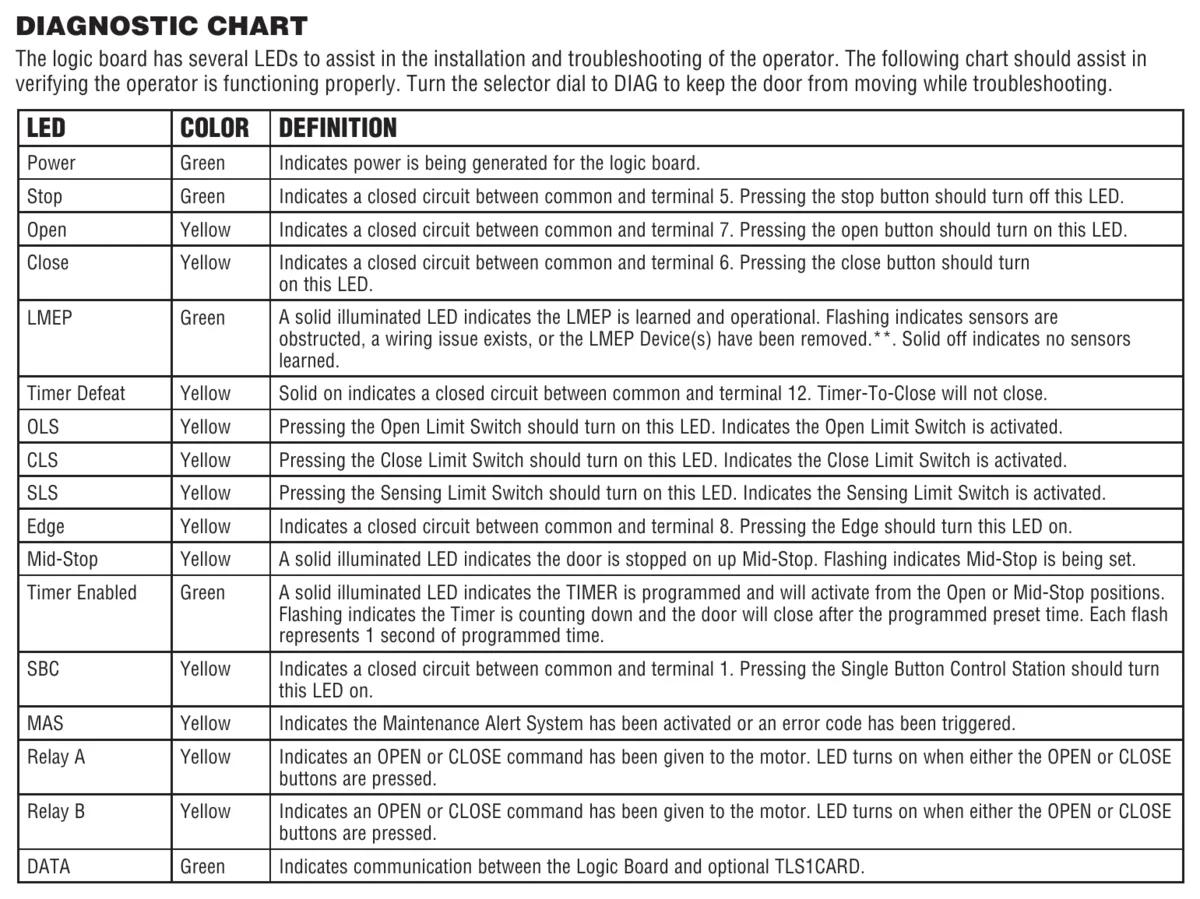
At power up, every LED lights except SBC, Relay A, Relay B and Timer Defeat. After 2 to 3 seconds only the ones that apply stay on. Between limits you should see 24Vac and STOP. At the closed limit you add CLS and SLS. At the open limit you add OLS. The MAS LED then blinks a code for the firmware version and goes out, unless the dial is sitting in DIAG, OPTN or PROG.
| LED | Colour | Meaning |
|---|---|---|
| Power | Green | Power is being generated for the logic board |
| Stop | Green | Closed circuit between common and terminal 5. Pressing stop turns it off. |
| Open | Yellow | Closed circuit between common and terminal 7 |
| Close | Yellow | Closed circuit between common and terminal 6 |
| LMEP | Green | Solid means a monitored device is learned and working. Flashing means blocked, a wiring fault, or a removed device. Off means none learned. |
| Timer Defeat | Yellow | Closed circuit between common and terminal 12. Timer-to-close won't run. |
| OLS, CLS, SLS | Yellow | Open, close and sensing limit switches activated |
| Edge | Yellow | Closed circuit between common and terminal 8 |
| Mid-Stop | Yellow | Solid at the mid-stop, flashing while it's being set |
| Timer Enabled | Green | Solid when the timer is programmed, flashing while it counts down |
| SBC | Yellow | Closed circuit between common and terminal 1 |
| Relay A and B | Yellow | An open or close command went to the motor |
| DATA | Green | Talking to an optional TLS1CARD |
When nothing responds at all
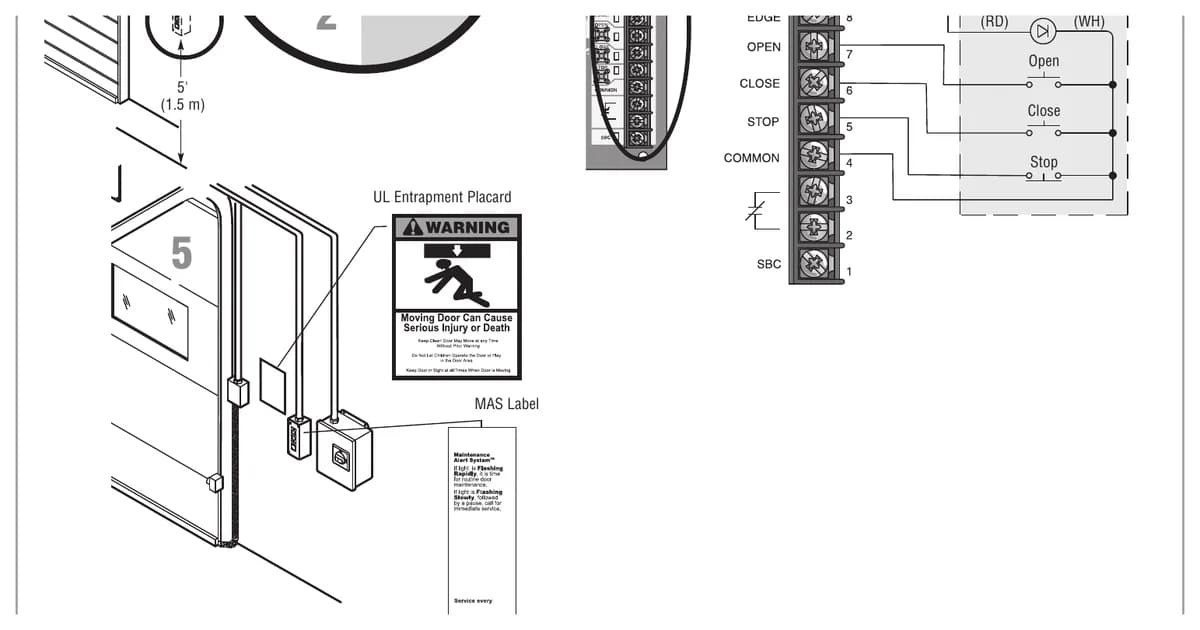
The manual's chart for "operator will not respond to any commands" runs through a set order. Check for power on L1, L2 and L3, the motor harness on the right voltage connector, and the transformer. Then check the control station wiring using the OPEN, CLOSE and STOP LEDs, and look for an open interlock. Make sure the selector dial isn't still in PROG, OPTN or DIAG. That last one catches techs all the time. After that, check for a hot motor on thermal overload. Then unplug every accessory and add them back one at a time. Boards come last.
One test separates the power board from the logic board. Press OPEN or CLOSE. If Relay A or B lights and the door doesn't move, the manual points at the power board.
A relay click just before the motor starts, with the relay LEDs flashing along with it, is normal on three phase current sense boards. Leave it alone.
Radio LED codes
The RADIO LED has its own set. R1 is a quick flash with no response, meaning an unlearned remote, so reprogram it. R2 is no LED activity. The manual blames a weak signal from a flat battery or interference, an incompatible remote, or a damaged antenna. Another R code covers a remote that's already learned to a function, which has to be erased and relearned to change it. If the door opens from the remote but won't close in C2, D1 or E2, there's no entrapment protection device. A sensing device is needed to close from a remote. Programming steps are on the LiftMaster remote programming guide.
Factory reset
To put most settings back to default, turn the dial to DIAG and hold STOP for 5 seconds. The MAS LED flashes when it's done. Timer to close goes to 0 and the MRT goes back to 90 seconds. Mid-stop and MAS switch off. Learned LMEP devices are dropped. Remotes and myQ devices stay, and so does the life of operator counter. Our Logic 5.0 cycle counter page shows how to read that counter.
Need a tech on site
If the codes point at a board or a motor, call CCGDS at (604) 206-5727. We're an authorized LiftMaster dealer in Richmond, working across Metro Vancouver around the clock. See the LiftMaster repair hub for models we service.