Short answer. LiftMaster entrapment protection on Logic 5.0 is called LMEP. It means a monitored photo eye or edge the board can supervise. Without one, the door needs constant pressure to close. A flashing LMEP LED on the board means a device is blocked or has a wiring fault. Until it's fixed, the door only closes in restricted close mode, where you hold CLOSE for 5 seconds.
UL 325 requires commercial door operators to be either constant pressure to close, or fitted with a primary external monitored entrapment protection device. LiftMaster's name for that device on Logic 5.0 is LMEP. Get it right and every timer and remote feature on the board opens up. Get it wrong and the door won't close for anyone. This LiftMaster entrapment protection guide walks through the parts and the wiring, then the faults. All of it comes from the Logic 5.0 installation manual.
Lock out power before mounting or wiring any eye or edge. The manual also says the door must be fully open or fully closed before you install the device.
Which wiring types need it
An LMEP device is required for wiring types B2, T, TS and FSTS, and it must not be disabled. For C2, D1 and E2 it's recommended, not required. With no LMEP connected, the board only offers C2, D1 or E2. That's why a site that "lost its timer" after a photo eye died is often just running in C2 now. The modes themselves are explained on the Logic 5.0 wiring types page.
Many programmable features also need an LMEP before they work. Remote programming and timer to close both sit behind it.
Monitored photo eyes and wire colours
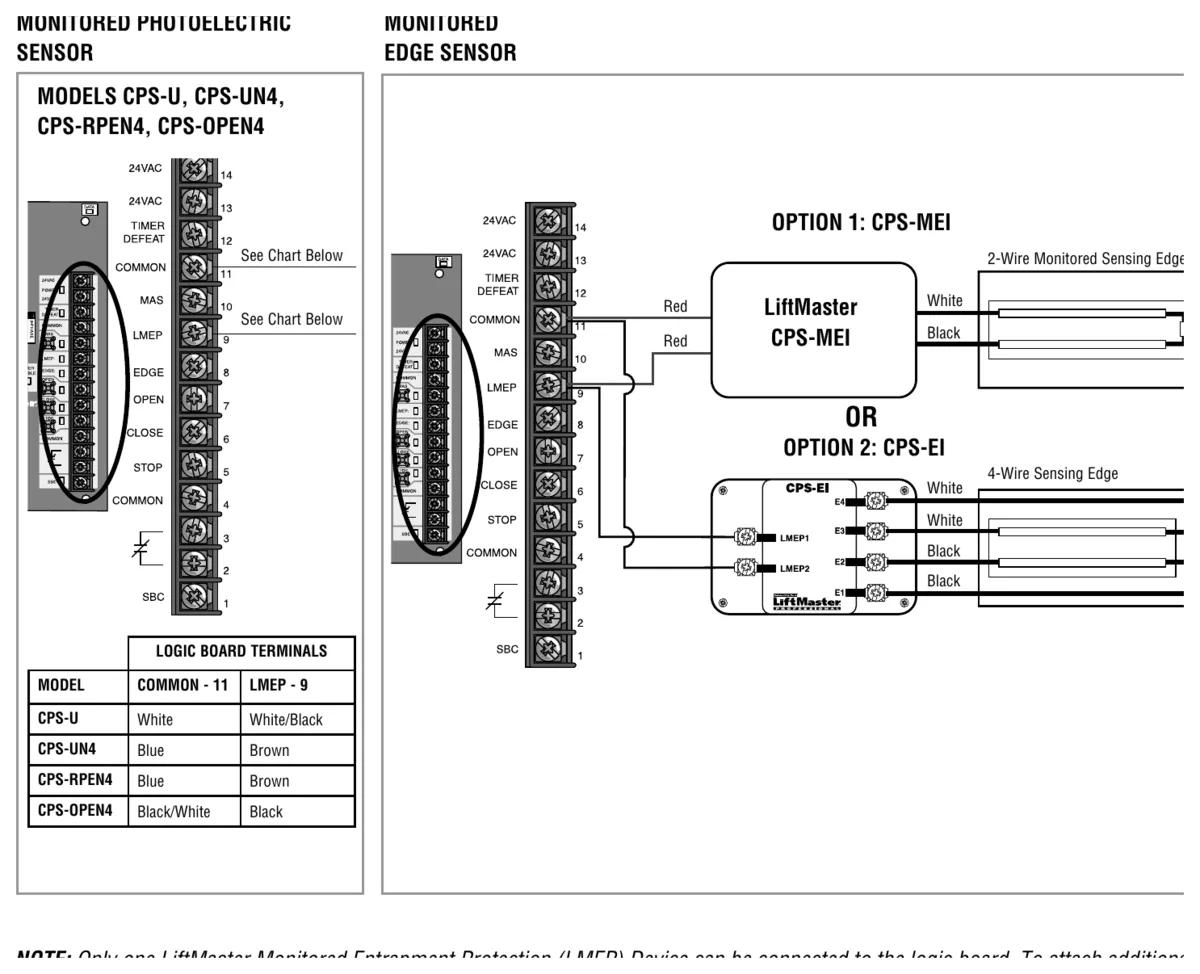
All four CPS photo eyes land on the logic board at terminal 11 (common) and terminal 9 (LMEP). Wire colour differs by model, and mixing them up is an easy mistake when someone swaps one model for another.
| Model | Type | Range | Common, terminal 11 | LMEP, terminal 9 |
|---|---|---|---|---|
| CPS-U | Dual sided infrared, NEMA 1, indoor | 30 ft | White | White/Black |
| CPS-UN4 | Thru-beam, NEMA 4, indoor or outdoor | 45 ft | Blue | Brown |
| CPS-RPEN4 | Retro-reflective, NEMA 4X | 50 ft | Blue | Brown |
| CPS-OPEN4 | Dual sided, flexible housings, NEMA 4X | 45 ft | Black/White | Black |
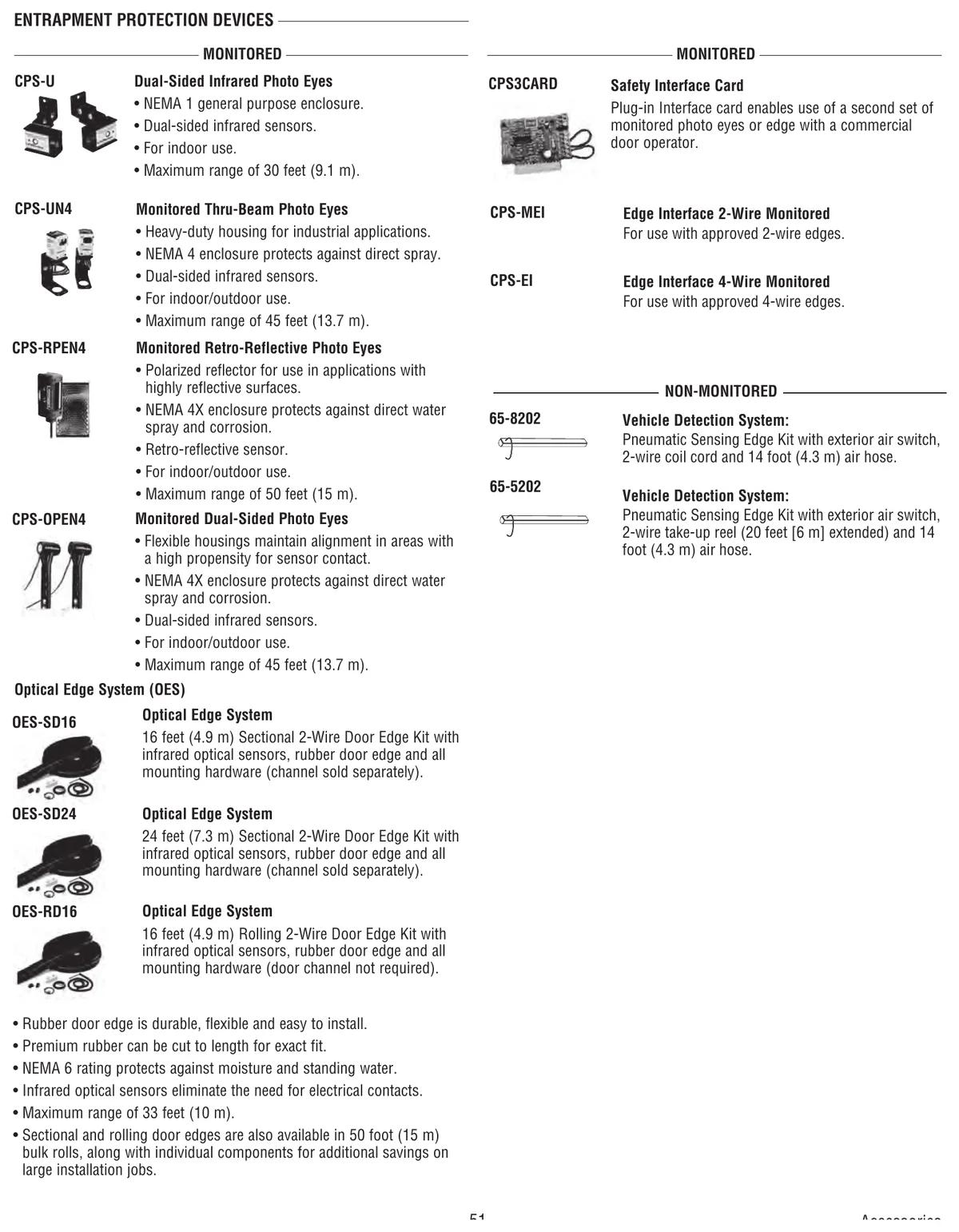
The primary photo eye beam goes no higher than 6 inches (15 cm) above the floor. Higher than that and a person lying in the opening isn't protected. On a Vancouver loading dock with trucks backing in, we'd pick the CPS-OPEN4. LiftMaster built its flexible housings to hold alignment in spots where the sensors get hit, and a busy dock is exactly that kind of spot.
Monitored edges
A sensing edge reaches the board through an interface. The CPS-MEI handles approved 2-wire monitored edges. The CPS-EI handles approved 4-wire edges. On a vertical door, the edge goes on the bottom of the door. On a horizontal slide door, LiftMaster wants edges on both the leading and trailing edges.
Only one LMEP device can connect straight to the board. To add a second one, such as eyes plus an edge, you need the CPS3CARD safety interface card. Non monitored secondary devices with a normally open dry contact wire to EDGE and COMMON, terminals 8 and 11. They add protection but they don't count as LMEP.
Why the door won't close
The LMEP LED tells most of the story. Solid green means a device is learned and working. Flashing means the sensors are blocked or there's a wiring problem. It also flashes if the device was removed. Off means nothing is learned.
When the LED flashes, the door opens normally but only closes in restricted close mode. Hold CLOSE, and after 5 seconds the operator starts to close and keeps going until it hits the close limit or you let go. If the fault lasts more than 2 minutes, the MAS LED flashes 7 blinks.
Work through it in this order. Remove anything in the beam. Check eye alignment. Check the wires for continuity and shorts. One catch from the manual is that with a CPS3CARD fitted, the LMEP LED won't flash when only one device is blocked, so check each one.
If the eyes have been removed for good and the board still thinks they're there and blocked, unlearn them. Disconnect the device, turn the dial to DIAG and hold STOP until the MAS LED flashes. That's the factory reset, so be ready to reprogram timers and the mid-stop afterwards.
Testing after any adjustment
LiftMaster says to test the entrapment devices after every adjustment and every month. For eyes, open the door and block the beam, then hold CLOSE. The door should not close and the LMEP LED should blink. Clear it and the door closes. For an edge, put an obstruction in the door's path and press and release CLOSE. The door should stop or reverse.
Monthly testing is the part nobody does. We'd rather a building manager spent two minutes on it than found out the hard way.
MAXUM and light curtains
MAXUM DC boards have three monitored inputs instead of one. You can run eyes and an edge together with no extra card. LiftMaster lists the LC-36A light curtain at 36 inches of coverage with 22 cross beams. The MAXUM troubleshooting guide has more. For how monitored and constant pressure setups compare across brands, see our entrapment protection types page.
Get it checked
CCGDS installs and services LiftMaster photo eyes and edges in Richmond and across Metro Vancouver. Call (604) 206-5727. More on the LiftMaster repair hub.